By Diane, November 21, 2026
Part of our American Preparedness Statistics 2027 report.
A warning only helps if it reaches you, you understand what it means, and you can act on it. A family contact plan only helps if everyone knows how to use it when ordinary communication breaks down. So emergency communications are about more than keeping a charged cellphone on the counter.
Here is a point worth sitting with: owning several devices does not automatically give you redundancy. Your smartphone, tablet, and laptop may all lean on the same cellular network, the same internet connection, or the same wall outlet. If that shared dependency fails, all three can go dark at the same moment. A stronger plan uses different pathways for different jobs: receiving official warnings, reaching household members, getting reliable updates, and coordinating help or reunification.
What Emergency Communications Must Accomplish
Communication preparedness is the ability to get reliable information, make decisions, and coordinate when the primary system fails. A warning can break down at several points: it may never be issued, it may not reach you, it may not be understood, or it may not lead to an action you can actually take. You might even get the warning and still be unable to reach the one person who has the transportation, the medication, the caregiving, or the evacuation role.
It helps to think about three separate jobs:
- Receive: learn what is happening and what authorities are asking people to do.
- Connect: let family, caregivers, and trusted contacts know where you are and whether you are safe.
- Coordinate: make decisions about sheltering, evacuation, assistance, and where to meet.
Know the Main Alert and Warning Channels
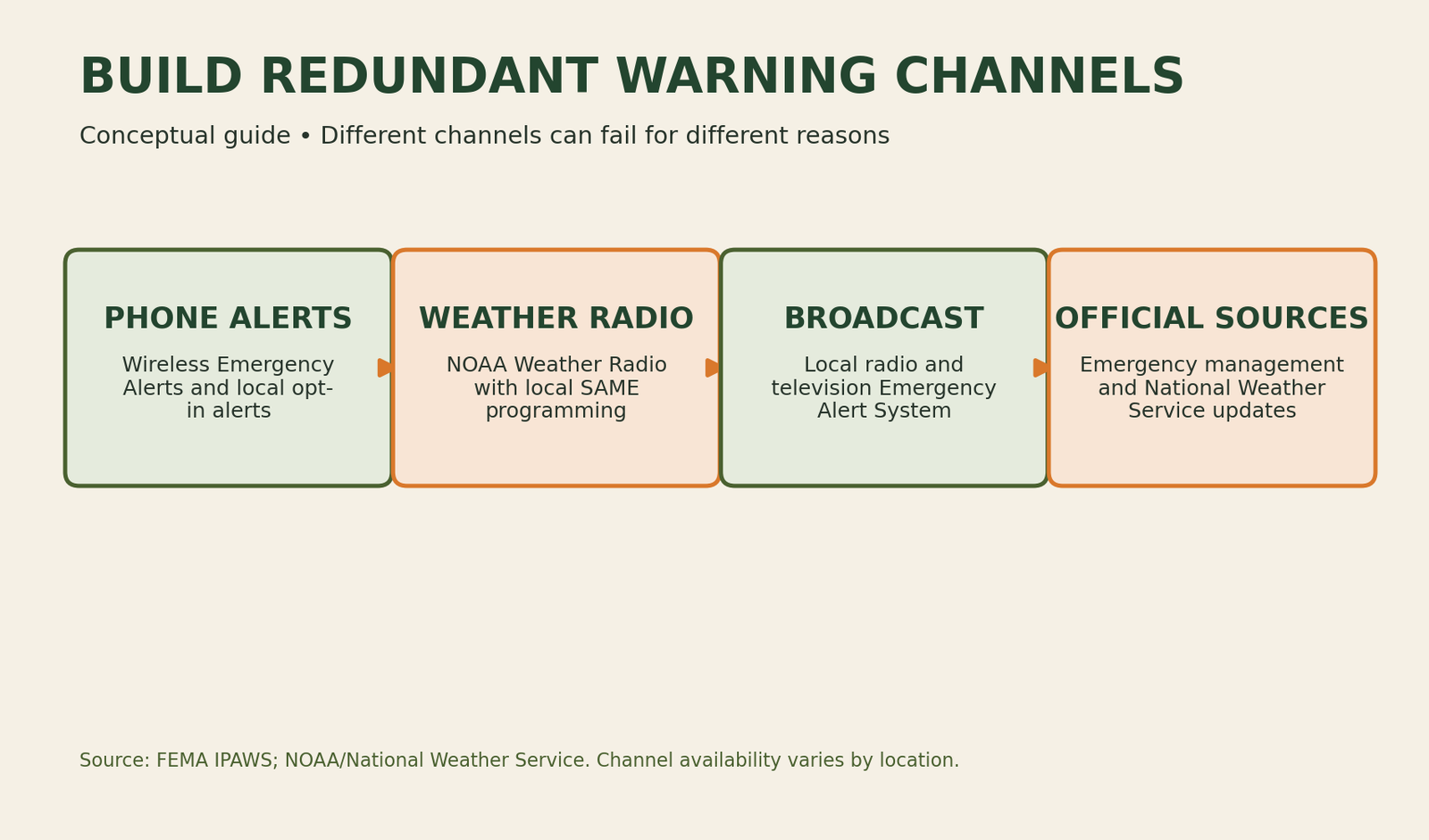
Wireless Emergency Alerts (WEA)
WEA messages are short alerts sent through participating wireless carriers to compatible phones in an affected area. You normally do not have to download an app or register to get them. They are built to grab your attention fast, not to spell out every detail, so read the action instruction first and then go to an official source for more.
Check that emergency alerts are turned on in your phone. The menus vary, so follow the manufacturer’s current instructions, keep the operating system updated, and remember that WEA delivery depends on a compatible device and participating carrier coverage. Do not treat a phone alert as your only warning method.
Local Emergency Notification Systems
Many city, county, and state emergency management agencies offer optional alerts by text, phone call, or email. These local systems can carry the details that matter most to you: evacuation zones, road closures, shelter locations, boil-water notices, and other local conditions. Find your local emergency management agency through an official government website and register the household members who need the alerts.
NOAA Weather Radio
NOAA Weather Radio All Hazards broadcasts official weather information and emergency messages around the clock. A dedicated receiver gives you a separate way to hear warnings, which matters most when internet access is gone. Reception depends on transmitter coverage, terrain, antenna placement, and the receiver itself.
For a household radio, look for a model with a tone alarm, Specific Area Message Encoding (SAME) so you can program it for the right county or counties, and battery backup. Confirm it receives the transmitter that serves your area, program it correctly, put it where you can hear the alarm, and test it. A radio that is not tuned, powered, or within reliable coverage is not a dependable backup.
Emergency Alert System (EAS), Radio, and Television
The Emergency Alert System pushes authorized alerts through radio and television broadcasters and other participating providers. Local radio can also carry ongoing reporting and official briefings. Keep a battery-powered or vehicle-powered AM/FM radio handy if it gives you a channel that does not depend on your home internet connection.
Apps, Websites, and Social Media
Official apps and websites can give you maps, forecasts, shelter information, and updates, but they need a working device and some form of connectivity. Follow your local emergency management office, your National Weather Service office, and the relevant public agencies before an emergency. Social media can help spread information, but posts can be incomplete, outdated, or flat-out false. Verify any consequential instruction against the agency responsible for issuing it.
A Radio Is Not a Family Communication System
A NOAA Weather Radio is mostly a one-way receiver: it helps you hear official information. It will not let you send a message to relatives or tell a caregiver you have evacuated. A two-way radio may support local communication in some situations, but range, terrain, interference, battery life, operating procedures, and licensing requirements all vary by equipment and service. Do not assume that a pair of radios adds up to a reliable neighborhood network.
Build a Family Communication Plan

Ready.gov and CDC guidance both recommend planning for separation, identifying ways to reconnect, and making sure everyone in the household knows how to contact one another. A written plan matters most when children, older adults, people with disabilities, pets, or caregivers are in different places with different responsibilities during the day.
Choose an Out-of-Area Contact
Pick a trusted friend or relative who lives far enough away that they are likely outside the affected area. Every household member should know that contact’s name and number. When local calls are difficult, everyone can send that one person a brief update, and the contact relays information among the family. Confirm the person agrees to take on the role.
Agree on Meeting Places
- One location close to home, in case household members get separated nearby.
- A second location outside the immediate neighborhood, in case you cannot reach the home or the street.
- A farther-away location or destination for an evacuation that takes the household out of the area.
Choose places that are realistic and accessible for your household, and line up alternatives in case a school, workplace, community building, or road is closed. Make sure everyone knows who decides for children or dependents if the usual caregiver cannot be reached.
Use Short Check-In Messages
When the network is congested, a text often gets through when a voice call will not. A short message carries the essentials without a whole conversation. Agree on a simple format, something like: I am safe. I am at this location. I am going to this next place. I will check in again at this time. And do not delay an immediate protective action just to send a message first.
Use voice calls when you genuinely need a conversation, but keep non-emergency calls short and avoid redialing over and over. Do not use 911 for general status updates; keep emergency services for situations that need immediate help.
Put the Plan on Paper
Do not keep your contact list only in a phone. Give each household member a printed card or paper copy, keep one in the home emergency kit, and tuck another into a wallet, backpack, or go-bag. Include:
- Household members’ names, mobile numbers, and email addresses.
- The out-of-area contact and at least two local contacts.
- Work, school, childcare, caregiver, and regular-activity contacts.
- Meeting places, the evacuation destination, and agreed check-in times.
- Relevant medical, accessibility, communication, or language needs.
- A plan for pets and service animals, including who can transport or care for them.
Use PACE to Test Whether Your Backups Are Real
PACE, which stands for Primary, Alternate, Contingency, and Emergency, is a planning heuristic. It is not a validated preparedness score. Use it to ask a simple question: what happens when the first communication route fails?
- Primary: your normal method, such as a mobile call or message.
- Alternate: a different method, such as an SMS text or a local alert channel.
- Contingency: a separate pathway, such as a battery-powered radio for official updates or an out-of-area contact to relay messages.
- Emergency: a pre-agreed procedure for when electronic communication is gone, such as meeting at a set place at a set time, if it is safe to travel.
The real test is whether your alternatives have different dependencies. A second app on the same phone does nothing if the battery is dead. A second phone on the same carrier does nothing if the local network is down. A weather radio gives you independent incoming information, but it cannot stand in for a two-way family check-in plan.
Power and Battery Planning
- Keep phones and power banks charged during periods of elevated risk. Recharge the power banks now and then, and follow the manufacturer’s storage instructions.
- Keep the correct charging cables with the power bank and in the go-bag.
- Know whether your vehicle can safely charge devices, and never run a vehicle in an enclosed garage.
- Reduce screen brightness, close power-hungry apps, and use battery-saving settings when you need to.
- Keep spare batteries for radios and other equipment, and check their expiration and condition.
- Account for accessibility needs: amplified or visual alerts, captioning, hearing assistance, larger text, simplified instructions, or language support.
A portable solar charger can help in the right conditions, but its output depends on sunlight, panel size, orientation, weather, and the device you are charging. Treat it as one possible charging option, not a guaranteed power supply.
When Communications Are Disrupted
- Follow the protective instruction in an official alert. Do not wait for a family reply before taking immediate action.
- Use a battery-powered radio or another independent channel to get official updates.
- Send a short text to the agreed contact if the network is available, with your status, location, and next step.
- Conserve battery power and cut back on nonessential calls, video, and data.
- If electronic methods fail, fall back on the written plan and the pre-agreed meeting procedures, but only when it is safe to travel.
- Keep checking official sources as conditions change. A route or shelter that was safe earlier may not be safe now.
Accessibility and Household Support
A communication plan has to work for the people who will actually use it. Someone who is deaf or hard of hearing may need visual alerts, text-based information, or another accessible notification method. Someone with low vision may need spoken alerts, large print, or a trusted person to read instructions aloud. Some people need plain-language directions, translation, extra time, or help operating devices. Older adults, people who use medical equipment, children, and people with cognitive or mobility limitations may need a named support person, and a backup if that person is not available.
Ask each person what would make the plan usable for them. Do not assume everyone in the household can hear a radio alarm, read a phone screen, drive, walk to a meeting point, or operate a two-way radio.
Verify Information Before Sharing It
In an emergency, bad information travels fast. Before you forward a warning, a screenshot, or a social-media post, check the date, the location, and the issuing agency. Look for the same information on the official emergency management, National Weather Service, or other responsible agency channel. If a post conflicts with an official evacuation or shelter instruction, follow the responsible authorities and get clarification through official channels.
Practice the Plan Before You Need It
- Test the NOAA Weather Radio and confirm the correct county or SAME settings.
- Check that phones can receive WEA and that your local alert subscriptions are current.
- Have each household member find the printed contact card without using a phone.
- Practice sending a check-in message and reaching the out-of-area contact.
- Walk through the meeting-place plan and spot any access barriers or closed-site alternatives.
- Repeat the exercise whenever someone changes jobs, schools, phone numbers, caregivers, or daily routines.
A Practical Household Communications Checklist

- WEA enabled on compatible phones.
- Registered for the relevant local emergency alerts.
- A working NOAA Weather Radio programmed for the correct area, if you use one.
- A battery-powered AM/FM radio or another independent official-information source.
- An out-of-area contact selected and informed.
- At least two meeting places agreed upon.
- Printed contact cards shared with household members.
- A check-in message format and schedule agreed upon.
- Charging cables, power banks, and spare batteries checked.
- Accessibility, language, medical, and caregiving needs included.
- The plan practiced and updated after household changes.
The Goal Is Continuity, Not a Collection of Gadgets
Emergency communication is not measured by how many devices you own. It is measured by whether your people can get reliable information, understand what it means, make decisions, and coordinate when the normal route is unavailable. A few well-chosen channels, a written contact plan, and regular practice give you more useful redundancy than a drawer full of devices that all depend on the same system.
More From the Preparedness Report
- Safe Room vs. Storm Shelter vs. Bunker
- Why Older Adults Face Different Preparedness Challenges
- Understanding the Preparedness Gap
Related tool: Pull your communications gear together with the rest of your supplies using our Emergency Kit Builder.
Sources and Further Reading
- FEMA, IPAWS 101.
- FEMA, Integrated Public Alert and Warning System.
- National Weather Service, Warning Dissemination.
- National Weather Service, NOAA Weather Radio FAQs.
- National Weather Service, Program Your NOAA Weather Radio.
- CDC, Stay Connected.
- Ready.gov, Make a Plan.
- SAMHSA and Ready.gov, Make a Plan Form.
- FCC, Consumer Tips for Communicating During Emergencies.
- National Weather Service, Communicating After Storms.